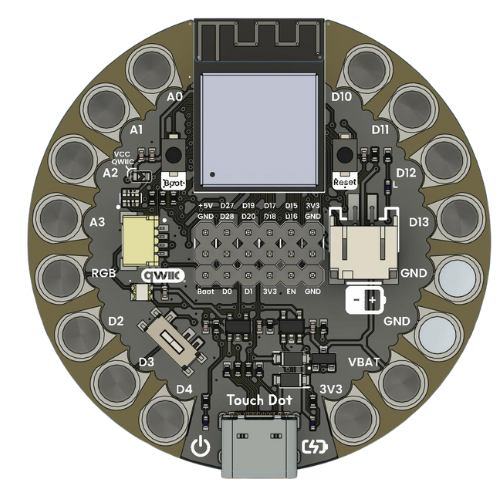
Deep Sleep Mode#
Overview#
The ESP32-S3 Deep Sleep mode is an ultra-low power state that significantly reduces power consumption by shutting down most of the chip’s components, including the CPU, most RAM, and digital peripherals. In this mode, only the RTC (Real-Time Clock) controller, RTC peripherals, and RTC memory remain powered, allowing the device to wake up from various sources while consuming minimal power (typically around 5-10 µA).
Deep Sleep is ideal for battery-powered applications that need to operate for extended periods with minimal power consumption, such as IoT sensors, wearables, and remote monitoring devices.
Features#
Ultra-low power consumption: ~5-10 µA in deep sleep mode
Multiple wake-up sources: External GPIO, timers, touch pads, ULP coprocessor
RTC memory retention: Preserve data across sleep cycles
Fast wake-up: Resume execution quickly from sleep state
Configurable wake conditions: Flexible wake-up triggers
Power domain control: Selective power management for different chip regions
Deep Sleep Wake-up Sources#
The ESP32-S3 supports multiple wake-up sources that can bring the chip out of deep sleep:
Wake Source |
Function |
Description |
|---|---|---|
EXT0 |
|
Wake up using a single RTC GPIO pin (level-triggered: HIGH or LOW) |
EXT1 |
|
Wake up using multiple RTC GPIO pins (supports AND/OR logic) |
Timer |
|
Wake up after a specified time period (microseconds) |
Touch Pad |
|
Wake up when touch sensor detects a touch event |
ULP |
|
Wake up by Ultra-Low-Power coprocessor program |
GPIO |
|
Wake up using GPIO pins (ESP32-S3 specific) |
GPIO Features and Capabilities#
RTC GPIO Pins (Deep Sleep Wake-up Capable)#
The ESP32-S3 has specific GPIO pins that are connected to the RTC domain and can be used as wake-up sources during deep sleep. These pins maintain their state and can trigger wake-up events.
GPIO |
RTC GPIO |
Wake Support |
Additional Features |
|---|---|---|---|
GPIO0 |
RTC_GPIO0 |
EXT0/EXT1 |
Strapping pin, ADC1_CH0, TOUCH1 |
GPIO1 |
RTC_GPIO1 |
EXT0/EXT1 |
ADC1_CH1, TOUCH2 |
GPIO2 |
RTC_GPIO2 |
EXT0/EXT1 |
ADC1_CH2, TOUCH3, Strapping pin |
GPIO3 |
RTC_GPIO3 |
EXT0/EXT1 |
ADC1_CH3, TOUCH4 |
GPIO4 |
RTC_GPIO4 |
EXT0/EXT1 |
ADC1_CH4, TOUCH5 |
GPIO5 |
RTC_GPIO5 |
EXT0/EXT1 |
ADC1_CH5, TOUCH6 |
GPIO6 |
RTC_GPIO6 |
EXT0/EXT1 |
ADC1_CH6, TOUCH7 |
GPIO7 |
RTC_GPIO7 |
EXT0/EXT1 |
ADC1_CH7, TOUCH8 |
GPIO8 |
RTC_GPIO8 |
EXT0/EXT1 |
ADC1_CH8, TOUCH9 |
GPIO9 |
RTC_GPIO9 |
EXT0/EXT1 |
ADC1_CH9, TOUCH10 |
GPIO10 |
RTC_GPIO10 |
EXT0/EXT1 |
ADC1_CH10, TOUCH11 |
GPIO11 |
RTC_GPIO11 |
EXT0/EXT1 |
ADC2_CH0, TOUCH12 |
GPIO12 |
RTC_GPIO12 |
EXT0/EXT1 |
ADC2_CH1, TOUCH13 |
GPIO13 |
RTC_GPIO13 |
EXT0/EXT1 |
ADC2_CH2, TOUCH14 |
GPIO14 |
RTC_GPIO14 |
EXT0/EXT1 |
ADC2_CH3, TOUCH15 |
GPIO15 |
RTC_GPIO15 |
EXT0/EXT1 |
ADC2_CH4, XTAL_32K_P |
GPIO16 |
RTC_GPIO16 |
EXT0/EXT1 |
ADC2_CH5, XTAL_32K_N |
GPIO17 |
RTC_GPIO17 |
EXT0/EXT1 |
ADC2_CH6 |
GPIO18 |
RTC_GPIO18 |
EXT0/EXT1 |
ADC2_CH7 |
GPIO19 |
RTC_GPIO19 |
EXT0/EXT1 |
ADC2_CH8, USB D- |
GPIO20 |
RTC_GPIO20 |
EXT0/EXT1 |
ADC2_CH9, USB D+ |
GPIO21 |
RTC_GPIO21 |
EXT0/EXT1 |
Can be used for RTC functions |
GPIO Wake-up Modes#
Mode |
Description |
|---|---|
Level Triggered (EXT0) |
Wake up when a single GPIO reaches a specific level (HIGH=1 or LOW=0). Simple and commonly used for button wake-up. |
Level Triggered (EXT1) |
Wake up when multiple GPIOs meet certain conditions. Supports:
|
Edge Triggered (GPIO) |
Wake up on rising or falling edge of GPIO signal. More flexible but requires ESP32-S3 specific API. |
Power Consumption Comparison#
Understanding the power consumption in different modes helps optimize battery life:
Mode |
Current Draw |
Use Case |
|---|---|---|
Active (WiFi TX) |
~160-260 mA |
Normal operation with WiFi transmitting |
Active (WiFi RX) |
~80-100 mA |
WiFi receiving/listening |
Modem Sleep |
~20-30 mA |
CPU active, WiFi/BT suspended |
Light Sleep |
~0.8-3 mA |
CPU suspended, peripherals can wake it |
Deep Sleep |
~5-10 µA |
Only RTC active, requires reset-like wake |
Hibernation |
~2-5 µA |
Minimal power, limited wake sources |
Complete Implementation Example#
This example demonstrates a power-efficient button interface that uses deep sleep to conserve battery life. The system monitors a button and enters deep sleep after 10 seconds of continuous press, then wakes up when the button is released.
Code Explanation#
Wake-up Configuration:
esp_sleep_enable_ext0_wakeup(WAKE_PIN, 1);
Configures GPIO11 as wake-up source
Parameter
1means wake on HIGH levelButton held LOW keeps device asleep
Releasing button (goes HIGH) triggers wake-up
Button State Machine:
Idle State: Button HIGH (not pressed), waiting for press
Pressed State: Button LOW, timer starts counting
Short Release: Button released before 10s → Normal UI interaction
Long Press: Button held for 10s → Enter deep sleep
Wake-up: Button released during sleep → System wakes and blinks LED
Power Optimization Strategy:
Active Mode: Only when monitoring button (20-30 mA)
Deep Sleep: After long press (~5-10 µA)
Battery Savings: ~99.97% reduction in power consumption during sleep
Alternative Wake-up Methods#
Timer-Based Wake-up#
Wake up after a specific time period (useful for periodic sensor readings):
#define uS_TO_S_FACTOR 1000000ULL  // Conversion factor for micro to seconds
#define TIME_TO_SLEEP  30          // Sleep for 30 seconds

void setup() {
  // Configure timer wake-up
  esp_sleep_enable_timer_wakeup(TIME_TO_SLEEP * uS_TO_S_FACTOR);

  Serial.println("Going to sleep for 30 seconds");
  esp_deep_sleep_start();
}
Multiple GPIO Wake-up (EXT1)#
Wake up when multiple buttons are pressed:
#define BUTTON1 GPIO_NUM_11
#define BUTTON2 GPIO_NUM_12
#define BUTTON3 GPIO_NUM_13

void setup() {
  // Wake when ANY button is pressed (goes HIGH)
  uint64_t mask = (1ULL << BUTTON1) | (1ULL << BUTTON2) | (1ULL << BUTTON3);
  esp_sleep_enable_ext1_wakeup(mask, ESP_EXT1_WAKEUP_ANY_HIGH);

  esp_deep_sleep_start();
}
Touch Pad Wake-up#
Wake up from capacitive touch sensor:
#include "driver/touch_pad.h"

#define TOUCH_THRESH  40  // Threshold for touch detection

void setup() {
  // Initialize touch pad
  touch_pad_init();
  touch_pad_set_voltage(TOUCH_HVOLT_2V7, TOUCH_LVOLT_0V5, TOUCH_HVOLT_ATTEN_1V);

  // Configure touch pad 9 (GPIO9) as wake source
  touch_pad_config(TOUCH_PAD_NUM9, TOUCH_THRESH);

  // Enable touch pad wake-up
  esp_sleep_enable_touchpad_wakeup();

  esp_deep_sleep_start();
}
Best Practices#
Always flush serial output before sleep:
Serial.println("Going to sleep...");
Serial.flush();  // Wait for transmission to complete
delay(100);
esp_deep_sleep_start();
Use RTC memory to preserve data across sleep cycles:
RTC_DATA_ATTR int bootCount = 0;  // Preserved in RTC memory

void setup() {
  bootCount++;
  Serial.printf("Boot number: %d\n", bootCount);
}
Disable unnecessary peripherals before sleep:
// Disable WiFi and Bluetooth
WiFi.disconnect(true);
WiFi.mode(WIFI_OFF);
btStop();
Consider wake-up latency (~100-500 ms) for time-critical applications
Test current consumption with a multimeter to verify sleep mode operation
Use appropriate pull-up/pull-down resistors on wake-up GPIO pins
Handle wake-up causes to provide appropriate behavior based on wake source
Troubleshooting#
Device doesn’t wake up:
Verify GPIO is RTC-capable (see GPIO table above)
Check wake-up level configuration (HIGH vs LOW)
Ensure external circuitry doesn’t hold pin in sleep state
Verify internal pull-up/pull-down configuration
High current consumption in sleep:
Disable WiFi/BT before sleeping
Check for peripherals keeping chip awake
Verify GPIO states (floating pins consume power)
Use deep sleep isolation for unused pins
Unexpected wake-ups:
Add debouncing to wake-up GPIO
Check for noise on wake-up lines
Verify wake-up conditions (EXT1 ANY_HIGH vs ALL_LOW)
Ensure stable power supply
API Reference#
Key Functions#
// Enable wake-up sources
esp_err_t esp_sleep_enable_ext0_wakeup(gpio_num_t gpio_num, int level);
esp_err_t esp_sleep_enable_ext1_wakeup(uint64_t mask, esp_sleep_ext1_wakeup_mode_t mode);
esp_err_t esp_sleep_enable_timer_wakeup(uint64_t time_in_us);
esp_err_t esp_sleep_enable_touchpad_wakeup();
esp_err_t esp_deep_sleep_enable_gpio_wakeup(uint64_t mask, esp_deepsleep_gpio_wake_up_mode_t mode);

// Enter sleep
void esp_deep_sleep_start();
void esp_light_sleep_start();

// Check wake-up cause
esp_sleep_wakeup_cause_t esp_sleep_get_wakeup_cause();

// Disable wake-up sources
esp_err_t esp_sleep_disable_wakeup_source(esp_sleep_source_t source);
Wake-up Causes#
typedef enum {
    ESP_SLEEP_WAKEUP_UNDEFINED,    // Not from sleep
    ESP_SLEEP_WAKEUP_ALL,          // Not a wake-up cause
    ESP_SLEEP_WAKEUP_EXT0,         // Wake by external signal (RTC_IO)
    ESP_SLEEP_WAKEUP_EXT1,         // Wake by external signal (RTC_CNTL)
    ESP_SLEEP_WAKEUP_TIMER,        // Wake by timer
    ESP_SLEEP_WAKEUP_TOUCHPAD,     // Wake by touchpad
    ESP_SLEEP_WAKEUP_ULP,          // Wake by ULP program
    ESP_SLEEP_WAKEUP_GPIO,         // Wake by GPIO
    ESP_SLEEP_WAKEUP_UART,         // Wake by UART
    ESP_SLEEP_WAKEUP_WIFI,         // Wake by WiFi
    ESP_SLEEP_WAKEUP_COCPU,        // Wake by COCPU int
    ESP_SLEEP_WAKEUP_COCPU_TRAP_TRIG,  // Wake by COCPU crash
    ESP_SLEEP_WAKEUP_BT           // Wake by BT
} esp_sleep_wakeup_cause_t;
See Also#
General Purpose Input/Output (GPIO) Pins - GPIO Configuration and Usage
Analog to Digital Conversion - ADC with Low Power Modes